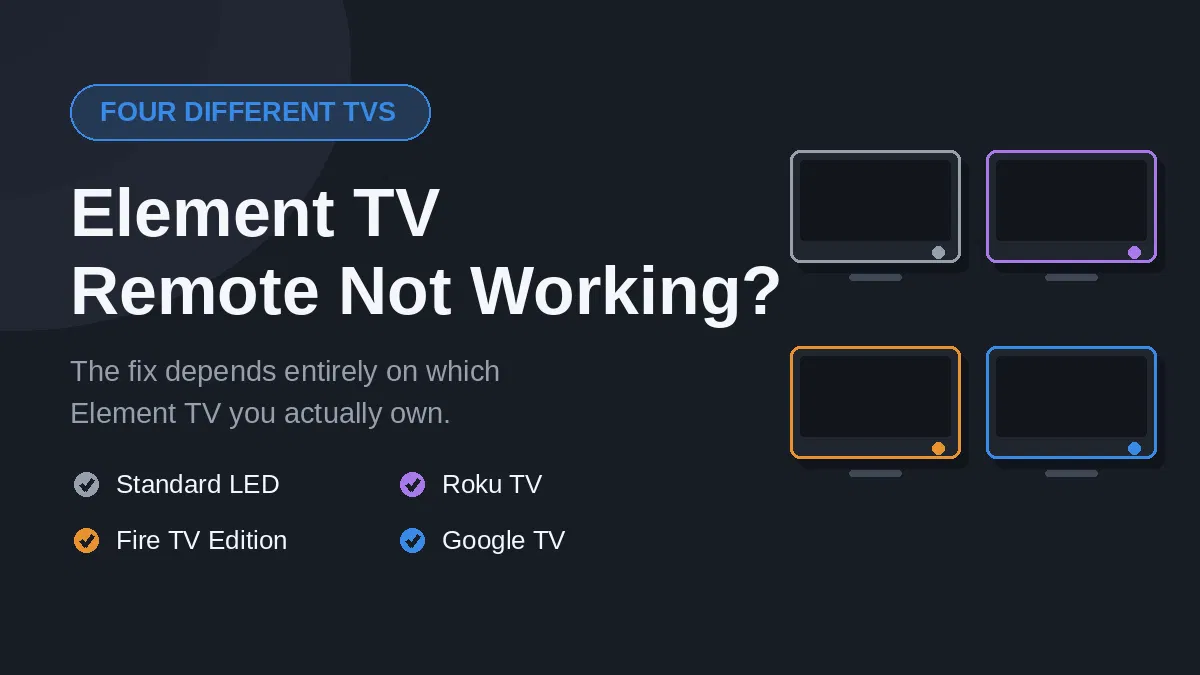
Element TV remote not working is one of those problems where the advice you find online often does not apply to your television at all. That is not bad luck. It is because Element sells four completely different kinds of TV under the same badge, and each one uses a different kind of remote.
Work out which one you have first, and the fix usually takes two minutes. Skip that step and you can spend an hour on advice written for somebody else’s set.
Element TV remote not working? Start by identifying your TV
Element has sold standard LED televisions, Roku TVs, Fire TV Edition sets and Google TV models. The remotes look broadly similar. The technology inside them is not.
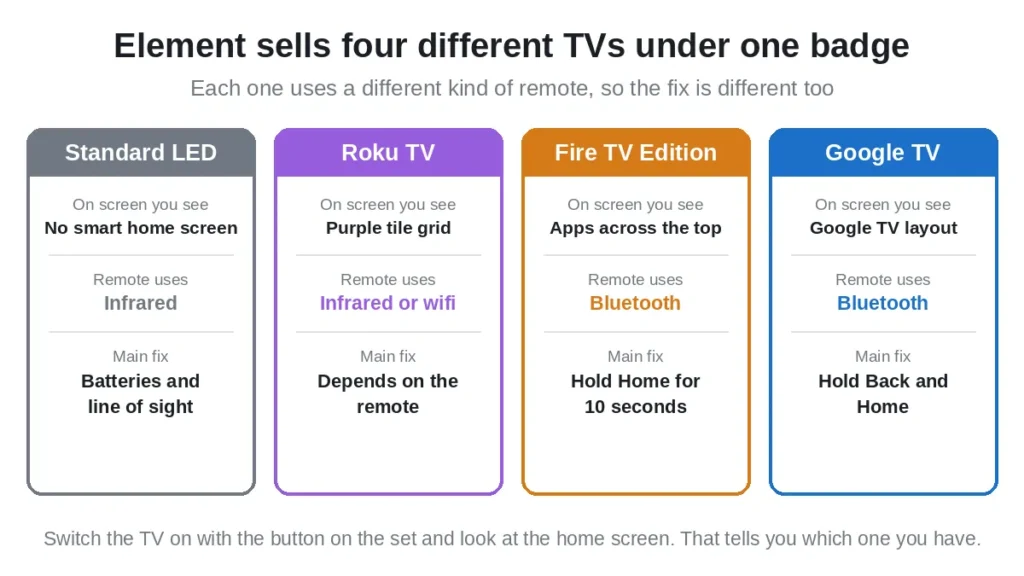
The quickest way to tell is to look at the TV itself, not the remote. Switch it on using the button on the set and watch what appears.
- A purple Roku home screen with a grid of channel tiles means you have an Element Roku TV.
- A Fire TV home screen with a row of apps across the top means an Element Fire TV Edition.
- A Google TV or Android TV home screen means an Element Google TV.
- No smart home screen at all, just a source or input list, means a standard Element LED TV.
If the remote is completely dead and you cannot reach any menu, the buttons on the TV will still change the input, which is usually enough to see which home screen loads.
Now find your type below. The battery and sensor advice near the end applies to all of them.
The phone camera test, and what it actually tells you
This test is worth thirty seconds, but only if you read the result correctly. Most guides get this wrong.
- Open the camera app on your phone
- Point the front tip of the remote at the lens
- Press and hold any button
- Watch the phone screen
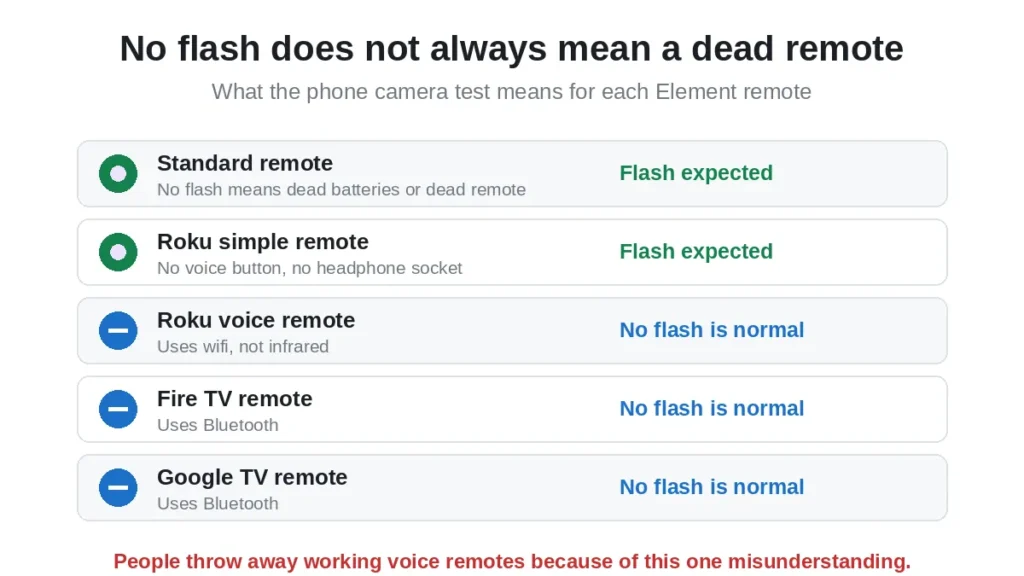
A faint purple flash means the remote is sending infrared. Here is the part that matters:
- Standard Element remote: you should see a flash. No flash means dead batteries or a dead remote.
- Roku simple remote, the plain one with no voice button: you should see a flash.
- Roku enhanced remote, with a voice button or headphone socket: no flash is normal. It uses wifi, not infrared.
- Fire TV remote: no flash is normal. It uses Bluetooth.
- Google TV remote: no flash is normal on most models. Bluetooth again.
So if you have a voice remote, seeing nothing on the camera does not mean it is broken. People throw away perfectly good remotes over this.
If your phone has more than one camera, use the front facing selfie camera. Some phones filter infrared out of the rear camera.
Fix for a standard Element LED TV remote
This is the simplest type. No pairing, no wifi, just infrared. If it has stopped working, it is one of four things.
- Fit fresh batteries from a sealed pack. Do not test the old ones, replace them. The infrared LED needs a short sharp burst of current, and a tired battery can fail at that while still reading as fine on a tester. This is why a remote can work from very close and do nothing from the sofa.
- Check the battery contacts. Budget remotes use thin springs that lose tension. If a battery wobbles in its slot, bend the spring gently outwards.
- Clear the sensor path. Covered further down.
- Free a stuck button. Take the batteries out, press every button several times, then refit. A button held slightly down makes the remote transmit that one command forever and ignore the rest.
Fix for an Element Roku TV remote
Roku TVs ship with two very different remotes, and the fix depends on which is in your hand.
Simple remote, no voice button
This one is infrared. Treat it exactly like the standard remote above. Batteries, contacts, clear line of sight. There is nothing to pair.
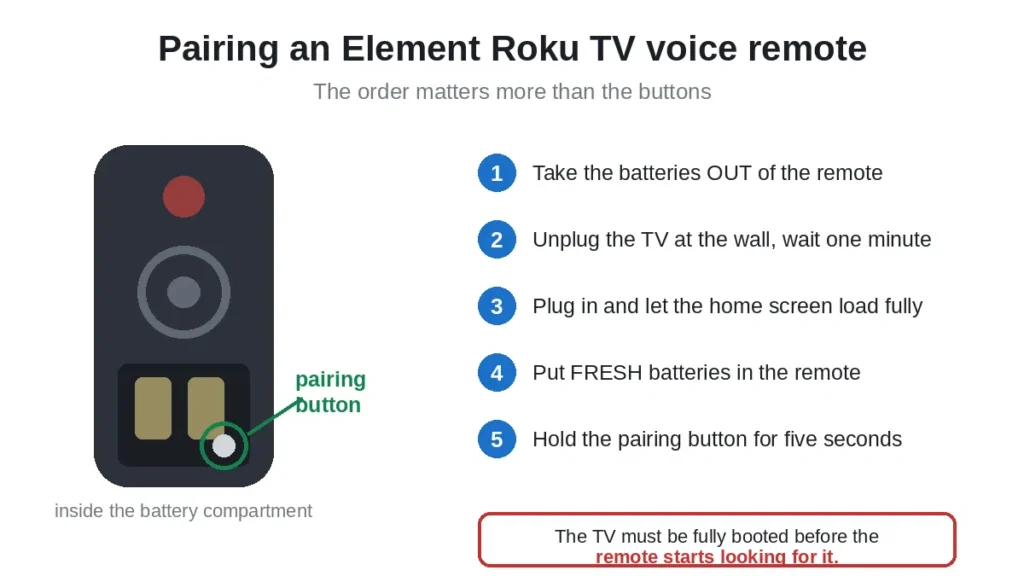
Enhanced remote, with a voice button or headphone socket
This one connects over wifi and has to be paired with the TV. Pairings drop after firmware updates and power cuts.
- Take the batteries out of the remote
- Unplug the TV at the wall and wait a full minute
- Plug the TV back in and wait for the home screen to load completely
- Put fresh batteries into the remote
- Find the small pairing button inside the battery compartment and hold it for about five seconds
- A pairing light flashes and a message appears on screen
The order matters here. The TV must be fully booted before the remote starts looking for it, which is why taking the batteries out first is part of the fix rather than a detail. Roku publishes its own remote guidance on its support site, and our guide to using a Roku TV without the remote covers what to do while you sort it out.
Fix for an Element Fire TV Edition remote
These are Bluetooth, so line of sight is irrelevant and there is no infrared to test. A dropped pairing is the usual cause.
- Fit fresh batteries first, because Bluetooth needs steadier voltage than infrared and weak cells cause exactly this symptom
- Stand within about three metres of the TV
- Press and hold the Home button for ten full seconds
- Release and wait. A discovery message should appear on screen
Ten seconds feels much longer than it sounds, and letting go early is the commonest reason this fails. If nothing happens, unplug the TV for a minute and try again. Our guide to reconnecting a Fire TV remote goes into more detail.
Fix for an Element Google TV remote
Also Bluetooth, with a slightly different pairing routine.
- Fit fresh batteries
- Hold the Back and Home buttons together for about five seconds
- On some models it is Back and the Right arrow instead
- Keep the remote close to the TV while you do it
- Watch for the pairing message on screen
If you can still reach the menus using the buttons on the TV, go to Settings, then Remotes and Accessories, and start pairing from there instead. It is more reliable than the button combination.
Clear the path to the sensor
This only matters for infrared remotes, which means the standard Element remote and the Roku simple remote. If you have a voice remote, skip this section entirely.
The sensor is a small dark window on the lower bezel, usually bottom right or bottom centre. Things that block it:
- A soundbar in front of the bottom edge of the screen
- A games console or box on the shelf below
- A plant, a photo frame, anything on the stand
- The protective plastic film, if the TV is new and nobody peeled it off
- A glass cabinet door, which weakens the signal noticeably
Stand directly in front, within about three metres, and aim at the bottom of the screen. If it works from there but not from your seat, you have found it. Strong afternoon sun falling on the sensor can also drown the signal out, which explains a remote that only misbehaves at one time of day.
Control the TV while you sort the remote out
You do not have to sit without a remote while you work through this. Each platform has a free app, and the right one depends on which TV you identified at the top.
- Element Roku TV: the Roku mobile app, over your home wifi
- Element Fire TV: the Amazon Fire TV app
- Element Google TV: the Google TV app, or Google Home on some models
- Standard Element LED TV: no app, because there is no network connection. You need a phone with an infrared blaster, covered in our guide to using a smartphone as a TV remote
Your phone and the TV have to be on the same wifi network for the first three. One honest limitation: on most models the app cannot switch the TV on from fully off, because the network radio sleeps.
Reset the remote
Works on every type, and clears stored state that nothing else touches.
- Take both batteries out
- Press and hold the power button for sixty seconds, batteries still out
- Press every other button once, including the ones you never use
- Put fresh batteries back in
- Pair again if yours is a pairing remote
When the remote needs replacing
Replace it when all of these are true:
- Fresh batteries made no difference
- The pairing routine for your type failed more than twice
- The battery contacts are corroded, or buttons feel mushy and do not spring back
Buy the remote for your platform, not just for the brand. An Element Roku TV needs a Roku TV remote, and a Fire TV Edition needs a Fire TV remote. They are not interchangeable, and this is the mistake people make most often when buying a replacement.
A universal remote is an option for the standard LED sets, and our list of universal TV remote control codes covers the codes. It is a poor choice for the smart models, because it cannot reach the voice or app functions. Element also lists replacement parts and troubleshooting on its own support site.
Frequently asked questions
Why is my Element TV remote not working after new batteries?
If it is a voice remote, the pairing has probably dropped rather than the batteries being the issue. Follow the pairing steps for your platform. If it is a plain infrared remote, run the phone camera test. No flash with fresh batteries means the remote itself has failed.
How do I know which Element TV I have?
Switch the TV on and look at the home screen. A purple tile grid is Roku, a row of apps across the top is Fire TV, a Google TV layout is Google TV, and no smart screen at all is a standard LED set.
My Element remote shows no light on the phone camera. Is it dead?
Not necessarily. Only infrared remotes flash. If yours has a voice button or a headphone socket, it uses wifi or Bluetooth, and no flash is completely normal.
How do I pair an Element Roku TV remote?
Take the batteries out, unplug the TV for a minute, plug it back in and let it boot fully, then fit fresh batteries and hold the pairing button inside the battery compartment for five seconds.
How do I pair an Element Fire TV remote?
Stand near the TV and hold the Home button for ten full seconds. Fit fresh batteries first, because Bluetooth pairing fails on weak cells.
Can I use any universal remote on an Element TV?
On a standard Element LED TV, yes. On an Element Roku, Fire TV or Google TV, a universal remote will handle power, volume and input but not the voice button or the app shortcuts.
Why does my Element remote only work when I am close to the TV?
Weak batteries, almost always. The infrared LED needs a sharp burst of current, and tired batteries can manage it at short range but not across a room.
Can I control an Element TV without any remote?
Yes, if it is a smart model. Use the Roku, Fire TV or Google TV app over your home wifi. A standard LED Element has buttons on the set itself, usually underneath the bottom bezel or behind the lower right corner.
In short
Identify the TV before you try anything, because Element sells four different platforms and each remote works differently. Run the phone camera test, but read the result against your remote type, since no flash is normal on a voice remote. Fit fresh batteries whatever type you have. Then follow the pairing steps for your platform, or clear the sensor path if yours is infrared.
If you are dealing with a similar fault on another budget brand, our guide to the Onn Roku TV remote not working follows the same logic.

Sidra is a skilled content writer with over 9 years of experience, creating clear and helpful articles on a wide range of topics. Sidra is also well-known for her knowledge of remote controls, codes, and setup guides, helping thousands of people with simple and reliable solutions. Her goal is to combine expert content writing with practical knowledge, making information easy to understand and useful for everyone. In her free time, she enjoys exploring new technology and sharing helpful tips with the community.
