Westinghouse TV remote not working is a problem with three completely different causes, and the advice you find in forums usually addresses only one of them. Before you replace anything, work out which symptom you actually have. The fix is different for each, and two of the three have nothing to do with the remote at all.
Westinghouse TV remote not working: which symptom do you have?
Read these three and pick yours. It saves you working through fixes written for somebody else’s problem.
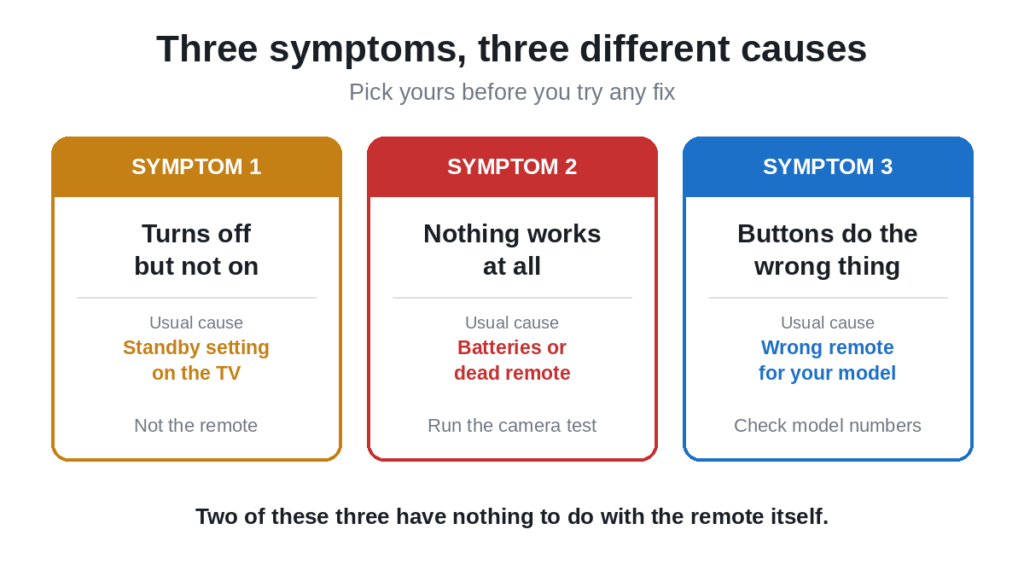
- The remote turns the TV off but will not turn it back on. This is the most reported Westinghouse symptom and it is almost never the remote. Go to the next section.
- Nothing happens at all, no matter which button. Hardware or batteries. Start with the phone camera test further down.
- Buttons work but do the wrong thing, for example the menu opens when you press channel. The remote is talking to the TV but the two do not agree on the codes. Covered near the bottom.
The remote turns the TV off but will not turn it on
This one confuses everybody, because it feels impossible. If the remote can switch the TV off, it clearly works. So why will it not switch it back on?
There are two real explanations, and neither means a faulty remote.
Reason one: the TV is in deep standby
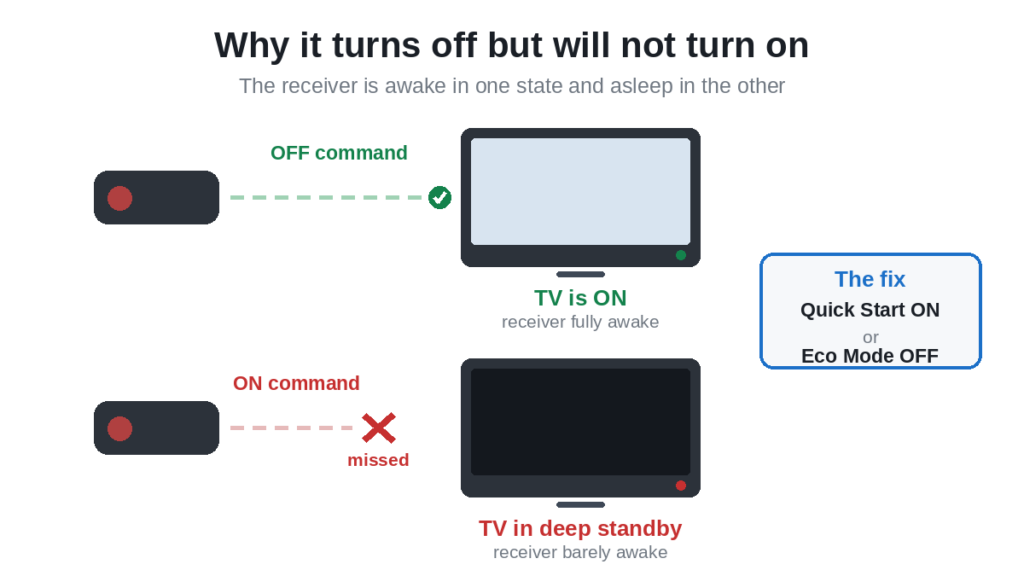
When the TV is on, its infrared receiver is fully powered and listening. When you switch it off, most Westinghouse sets drop into a low power standby to save electricity, and in that state the receiver is barely awake.
So the off command lands on a fully alert TV and works. The on command lands on a sleeping one and gets missed.
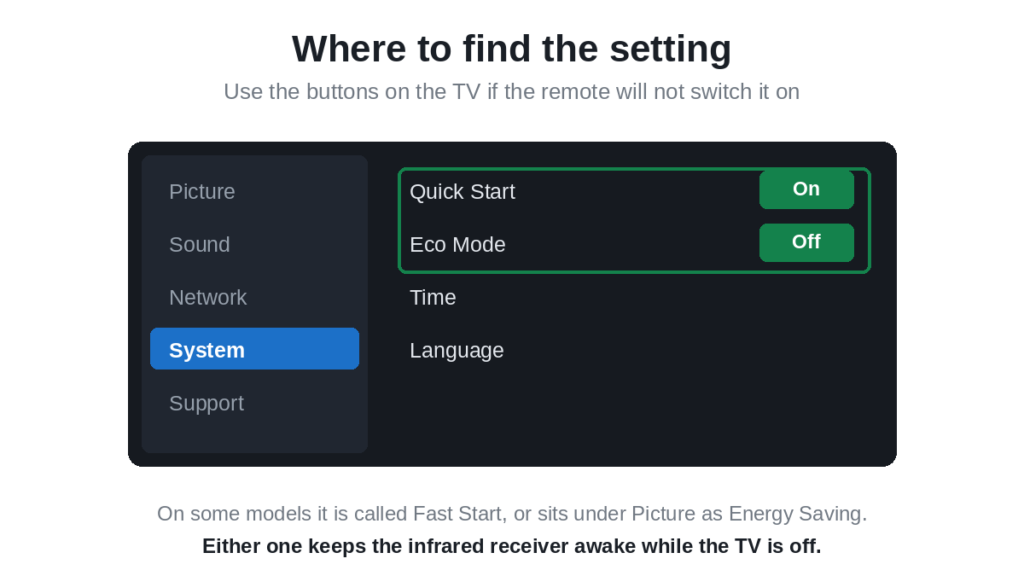
The fix is a setting, not a repair. Using the buttons on the TV itself, go into the menu and look for one of these:
- Quick Start or Fast Start, usually under System or General
- Eco Mode or Energy Saving, usually under Picture or System
Switch Quick Start on, or Eco Mode off. Either keeps the receiver properly awake in standby. The TV will use a tiny amount more electricity, which is the trade you are making.
Reason two: a discrete power code
This one applies if you are using a cable box remote, a universal remote, or a replacement that did not come with the TV.
Televisions accept two kinds of power command. A toggle command means “switch to the opposite of whatever you are now”. A discrete command means specifically “power on” or specifically “power off”.
Third party remotes often end up mapped to the discrete off command while the discrete on command does not match your set. The result is exactly what you are seeing: reliable off, no on.
If this is you, reprogramme the remote with a different code for Westinghouse rather than assuming it is broken. Our list of universal TV remote control codes has the alternatives, and you want to test power on specifically, not just power off.
Nothing happens at all: the phone camera test
Thirty seconds, and it tells you whether the remote is even transmitting.
- Open the camera app on your phone
- Point the front tip of the remote at the lens
- Press and hold any button
- Watch the phone screen, not the remote
A faint purple or white flash means the remote is sending infrared and the hardware is fine. No flash means batteries or a dead remote.
If your phone has more than one camera, use the front facing selfie camera, because some phones filter infrared out of the rear one.
One exception. If you have a Westinghouse Roku TV and your remote has a voice button or a headphone socket, it uses wifi rather than infrared, and no flash is completely normal. Do not throw it away on the strength of this test.
Batteries, and why they cause exactly this
Replace them, do not test them. The infrared LED fires in short sharp bursts, and a battery can read as perfectly healthy on a tester while failing to deliver that burst. This is why a remote can work from close up and do nothing from the sofa.
- Slide off the back cover
- Take both batteries out
- Fit a fresh pair from a sealed pack, not from a drawer
- Check the plus and minus ends against the markings
Use both from the same pack. An old cell paired with a new one gives you the performance of the old one.
While the compartment is open, check the metal springs. Budget remotes use thin contacts that lose tension, and a battery that wobbles in its slot is not making a reliable connection. Bend the spring gently outwards with a fingernail.
White or green powder means a leaked battery has corroded the contacts. Clean it with a cotton bud and a little white vinegar, dry it completely, then try again.
If you have a Westinghouse Roku TV
Westinghouse has sold Roku TV models alongside its standard sets, and those come with either a simple infrared remote or an enhanced remote that connects over wifi.
If yours has a voice button or a headphone socket, it is the enhanced type and it has to be paired. Pairings drop after firmware updates and power cuts.
- Take the batteries out of the remote
- Unplug the TV at the wall and wait a full minute
- Plug it back in and let the home screen load completely
- Put fresh batteries into the remote
- Hold the pairing button inside the battery compartment for about five seconds
The order matters. The TV has to be fully booted before the remote starts looking for it. Roku’s own guidance is on its support site, and our guide to the Onn Roku TV remote not working covers the same routine in more depth.
Clear the path to the sensor
Only matters for infrared remotes. The sensor is a small dark window on the lower bezel, usually bottom right or bottom centre.
- A soundbar in front of the bottom edge of the screen
- A games console or box on the shelf below
- A plant, a photo frame, anything on the stand
- The protective plastic film, if the set is new and nobody peeled it off
- A glass cabinet door, which weakens the signal noticeably
Stand within three metres, directly in front, and aim at the bottom of the screen. If it works from there but not from your seat, that is your answer. Strong afternoon sun on the sensor can also drown the signal out.
Buttons work but do the wrong thing
If pressing channel opens the menu, or a button does something unexpected, the remote and the TV are communicating but disagreeing. This happens with replacement remotes that are not the exact model.
Westinghouse has used several remote layouts, and a remote from a different model year can send codes the TV reads differently. It is not faulty, it is simply not the right one.
Check the model number printed inside the battery compartment against your TV’s model, which is on a label on the back. If they do not belong together, that is the problem, and no amount of resetting will fix it.
A universal remote is often a better answer here than hunting for the exact original. Our picks for the best universal remotes cover the options.
Reset the remote
- Take both batteries out
- Press and hold the power button for sixty seconds, batteries still out
- Press every other button once, including the ones you never use
- Put fresh batteries back in
Step three matters. A button held slightly down by dust or a spilled drink makes the remote transmit that one command continuously and ignore everything else. A stuck volume button is why some people find the volume creeping up on its own.
Control the TV while you sort it out
If yours is a Westinghouse Roku TV, the free Roku mobile app controls it over your home wifi, and no infrared is involved.
If it is a standard Westinghouse LED set, there is no network connection and no app. You need a phone with an infrared blaster, covered in our guide to using a smartphone as a TV remote, or the buttons on the TV itself, usually underneath the bottom bezel or behind the lower right corner.
Frequently asked questions
Why does my Westinghouse remote turn the TV off but not on?
Usually because the TV drops into a deep standby that leaves its infrared receiver barely awake. Switch Quick Start on, or Eco Mode off, in the TV menu. If you are using a universal or cable remote, the other cause is a discrete power code that matches for off but not for on, which a different code will fix.
Where is the Quick Start setting on a Westinghouse TV?
Under System or General in the TV menu on most models. On some it appears as Eco Mode or Energy Saving under Picture instead. Use the buttons on the TV to get there if the remote will not switch it on.
My Westinghouse remote shows no light on the phone camera. Is it dead?
If it is a plain infrared remote, yes, assuming you have fitted fresh batteries. If it is a Roku voice remote with a microphone button or headphone socket, no flash is normal because it uses wifi.
Can I use any remote on a Westinghouse TV?
A universal remote will work on a standard Westinghouse set once programmed. A replacement Westinghouse remote from a different model year may send codes your TV reads differently, which is why buttons sometimes do the wrong thing.
How do I pair a Westinghouse Roku TV remote?
Batteries out, unplug the TV for a minute, plug it in and let it boot fully, then fit fresh batteries and hold the pairing button inside the battery compartment for five seconds.
Why does the menu open when I press channel?
The remote is not the right one for your model. Westinghouse has used several layouts and codes over the years. Check the model number inside the battery compartment against the one on the back of the TV.
My remote only works close to the TV. Why?
Weak batteries, almost always. The infrared LED needs a sharp burst of current, and tired cells manage it at short range but not across a room.
Can I control a Westinghouse TV without a remote?
On a Roku model, yes, with the free Roku app over wifi. On a standard set there is no app, but there are buttons on the TV, usually under the bottom bezel or behind the lower right corner.
In short
Identify the symptom before you try anything. If the remote switches the TV off but not on, it is almost certainly the standby setting rather than the remote, so turn Quick Start on or Eco Mode off. If nothing works at all, run the phone camera test and fit fresh batteries. If buttons do the wrong thing, you have the wrong remote for your model.
For the same fault on another budget brand, our guide to the Element TV remote not working follows a similar approach.

Sidra is a skilled content writer with over 9 years of experience, creating clear and helpful articles on a wide range of topics. Sidra is also well-known for her knowledge of remote controls, codes, and setup guides, helping thousands of people with simple and reliable solutions. Her goal is to combine expert content writing with practical knowledge, making information easy to understand and useful for everyone. In her free time, she enjoys exploring new technology and sharing helpful tips with the community.
