GE universal remote codes are listed below for televisions, DVD and Blu-ray players, cable and satellite boxes, soundbars and streaming devices. Before you try any of them, there is one check worth thirty seconds, because it decides whether any code on this page will work at all.
Check your code list version first
This is the step almost every code list skips, and it is the reason most people end up thinking their remote is broken.
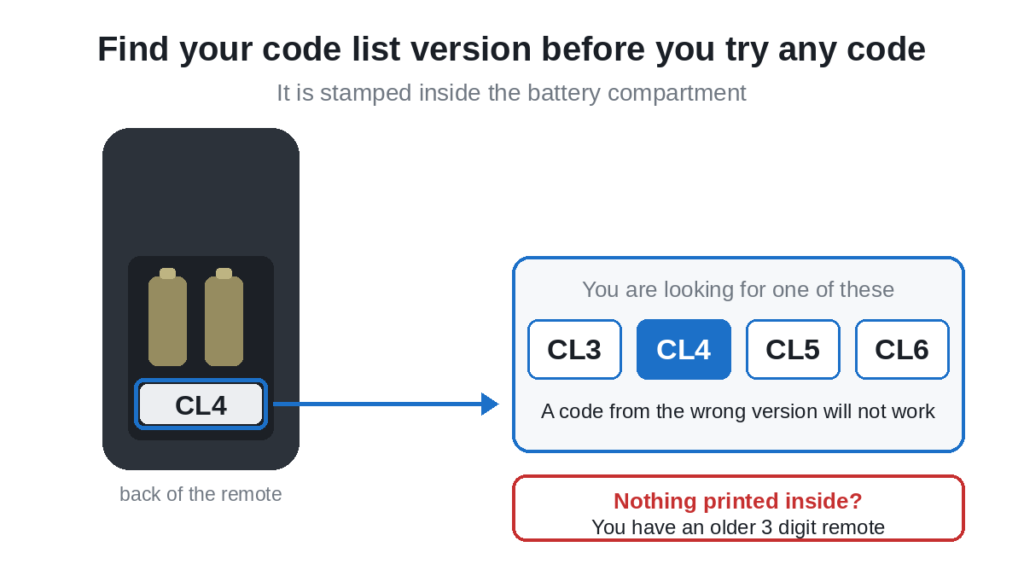
GE does not use one single code list. It uses four, named CL3, CL4, CL5 and CL6.These lists are maintained by Jasco, the company that manufactures GE
branded remotes, and the full code lists for each version are published
online.
To find yours:
- Turn the remote over and slide off the battery cover
- Take the batteries out
- Look at the floor of the compartment, and at the inside of the cover
- You are looking for a small printed label reading CL3, CL4, CL5 or CL6
Write it down. If there is nothing printed anywhere, your remote is likely an older three digit model, and the three digit section near the bottom of this page is the one you want.
One more thing worth knowing. GE remotes use three or four digits, never five. If you have found a five digit code for your TV somewhere, it belongs to a different brand of remote, probably One For All, and it will not work here.
Try these first
If you just want this finished, these are the GE codes that cover the widest range of sets. Put the remote in TV mode and work down the list.
0001, 0004, 0012, 0105, 0077, 6171
One of those covers a surprising number of televisions. If none of them work, find your brand in the table below.
GE universal remote codes for TVs
Find your TV brand and try the codes left to right. The first one or two in each row are the ones that work most often.
| TV brand | GE codes to try, in order |
|---|---|
| Apex | 0045, 0191, 0431, 1025, 2521 |
| Blackweb | 0004, 0072, 0180, 1094, 1171 |
| Element | 1025, 1173, 1218 |
| Emerson | 0141, 0201, 0231, 0951, 1551, 2761 |
| Hisense | 0001, 0073, 0216, 0671, 1651, 2081, 2141, 2211, 4391, 5331, 5341, 6161, 6171 |
| Hitachi | 0925, 1041, 4331 |
| Insignia | 1204, 1241, 1326 |
| JVC | 0311, 0481, 0771, 1281, 1481, 5071 |
| LG | 0001, 0004, 0005, 0009, 0012, 0050, 0057, 0080, 0156, 0178, 0227, 0338, 1181, 1221, 1423, 1911, 3001, 5511, 6021 |
| Magnavox | 0141, 0201, 0975, 4191, 4261, 4641, 4761, 5741 |
| Panasonic | 0003, 0054, 0062, 0170, 0171, 0381, 0950, 1571, 5201, 5531, 5821, 6231 |
| Philips | 0181, 0201, 0911, 3981, 4261, 5741, 6051, 6221 |
| RCA | 0001, 0131, 1001, 1004, 1444, 1521, 1731, 2011, 2121, 2361, 4921 |
| Samsung | 0004, 0005, 0009, 0012, 0015, 0075, 0077, 0080, 0093, 0104, 0105, 0106, 0172, 0255, 0942, 1305, 1535, 1725, 2185, 3301, 5791, 5801 |
| Sanyo | 0049, 0097, 0490, 1142, 1161, 1180, 2891, 5251, 5261 |
| Sharp | 0001, 0004, 0009, 0020, 0063, 0079, 0095, 0122, 0123, 3191, 5341, 5941, 6001, 6011, 6171 |
| Sony | 0002, 0011, 0013, 0071, 0080, 0128, 0380, 1071, 1901, 2741, 4981, 5321, 5811 |
| Sylvania | 0001, 0141, 0201, 0321, 0931, 1381, 2761, 4761 |
| TCL | 5771, 5961, 6031, 6171, 6201 |
| Toshiba | 0012, 0049, 0095, 0105, 0109, 0117, 0120, 0141, 0159, 0170, 0178, 0211, 0341, 0821, 0924, 1121, 1311, 1571, 1801, 2691, 4891, 5081, 5531 |
| Vizio | 0081, 0112, 0120, 0864, 0885, 1161, 1169, 1421, 1756, 1758, 1881, 2029, 5561, 5611, 5621, 5631, 5651, 5711, 6111, 6121, 6131, 6471, 6511 |
| Westinghouse | 0111, 1891, 2141, 2281, 3241, 5781, 5971 |
| Zenith | 0001, 0061, 0931, 1181, 1221, 1631, 5281, 6021 |
You will notice the same code appearing under more than one brand. That is not an error. Many televisions are built on shared panels and electronics, and a universal remote indexes codes by the infrared protocol the set speaks rather than by the badge on the front, so one code genuinely can drive two different brands.
Most common GE codes, any brand
If your brand is not in the table above, or none of its codes work, run through this list. These are the codes GE ships most widely across its whole range.
| 0105 | 0077 | 0076 | 1099 | 1142 | 5022 | 0081 |
| 1499 | 5107 | 1017 | 0004 | 0005 | 0227 | 0338 |
| 0012 | 0001 | 0195 | 0180 | 0031 | 0002 | 6171 |
| 6251 | 6001 | 5771 | 5811 | 0103 | 0189 | 0217 |
| 0135 | 1101 | 0073 | 0182 | 0216 | 0821 | 1022 |
GE codes for DVD and Blu-ray players
Press the DVD device button before you enter any of these. A perfectly correct DVD code will appear to fail if the remote is still in TV mode.
| Player brand | GE codes to try, in order |
|---|---|
| Apex | 0045, 0245, 0425, 1025, 1105 |
| Insignia | 0205, 0285, 0445, 0975, 2365, 4205 |
| JVC | 0155, 0395, 0755, 1145, 2385 |
| LG | 0205, 0227, 0338, 0635, 0907, 1565, 2335, 2635, 4285, 6005 |
| Magnavox | 0105, 0295, 0445, 0735, 2425, 3815 |
| Panasonic | 0165, 0225, 0292, 0363, 0385, 0545, 1075, 2395, 2965, 4175, 6001, 6002 |
| Philips | 0105, 0265, 0445, 0735, 1045, 2415, 2615, 4105, 6002, 6008, 6019, 6022 |
| Pioneer | 0025, 0525, 0875, 1245, 2675, 4485 |
| RCA | 0146, 0215, 0915, 1105, 1135, 2465 |
| Samsung | 0075, 0240, 0255, 0358, 0455, 0565, 1305, 2325, 2485, 4125, 6001, 6012, 6032, 6055 |
| Sanyo | 0095, 0405, 2205, 2215, 2495 |
| Sony | 0324, 0365, 0379, 0389, 0535, 0715, 0895, 2305, 2865, 3995, 4165, 6006, 6049, 6095, 6099 |
| Toshiba | 0015, 0115, 0735, 1735, 2135, 2295, 2435, 4145 |
| Vizio | 2265, 4135, 4405, 4415 |
GE codes for cable, satellite and DVR boxes
Use the CBL or SAT device button for these. Note that the provider matters more than the manufacturer here, so look for your TV provider first.
| Provider or maker | GE codes to try, in order |
|---|---|
| AT&T | 0514, 0674, 0844, 1272, 1963 |
| Bell | 0073, 0173, 0984, 1963, 2073, 5491 |
| Charter | 0514, 0684, 0714, 1274, 1304, 1404 |
| Comcast and Xfinity | 0195, 0217, 0476, 0514, 0684, 0824, 1283, 1404, 1544, 2544, 8088 |
| Cox | 0514, 0734, 0824, 1324, 1404, 1444 |
| DirecTV | 0099, 0247, 0566, 0639, 0983, 1173, 1504, 1514, 2814, 8018, 8021 |
| Dish Network | 0073, 0173, 0775, 1003, 1013, 1775, 2073, 2083, 8041, 8045 |
| Motorola | 0004, 0194, 0374, 0514, 0824, 1283 |
| RCA | 0333, 0363, 0543, 0643, 0723, 0915 |
| Samsung | 0014, 0043, 1113, 1213, 2671 |
| Scientific Atlanta | 0124, 0134, 0498, 0574, 0834, 1203, 1404 |
| Time Warner | 0514, 0694, 0824, 1254, 1404 |
| Verizon | 0514, 0684, 0824, 1283, 1404, 2033 |
GE codes for streaming devices
| Device | GE codes to try, in order |
|---|---|
| Roku and GE Roku TV | 0903, 2014, 4395, 6171 |
| Apple TV | 2615 |
Streaming sticks are hit and miss with universal remotes, because many of them use Bluetooth rather than infrared. If these codes do nothing, check whether the original remote has a microphone button. If it does, the device is Bluetooth and no infrared code will reach it.
GE codes for soundbars and audio
Press the AUX or AUDIO device button first.
| 0001 | 0002 | 0195 | 1025 | 1105 | 1205 | 1305 |
| 1517 | 3151 |
Older three digit GE codes
Only for older GE remotes with no CL version printed inside. If your remote asks for four digits, skip this section.
| TV brand | GE codes to try, in order |
|---|---|
| Samsung | 045, 477, 505, 586 |
| Sharp | 018, 023, 107, 108 |
If your remote wants four digits and all you have is a three digit code, try adding a zero at the front. A remote expecting 0045 will often accept it where the old list printed 045.
Method 1: Enter the code directly
The fastest route when you already have a code.
- Switch the device on by hand, using the button on the device itself
- Press and hold Setup until the indicator light stays on
- Press the device button you need, TV, DVD, CBL or AUX
- Type the code from the tables above
- The light blinks twice or goes out, which means the code was accepted
- Point the remote at the device and press Power
If it switches off, you are close. Do not stop yet, because the next section matters.
Test the code properly before you stop
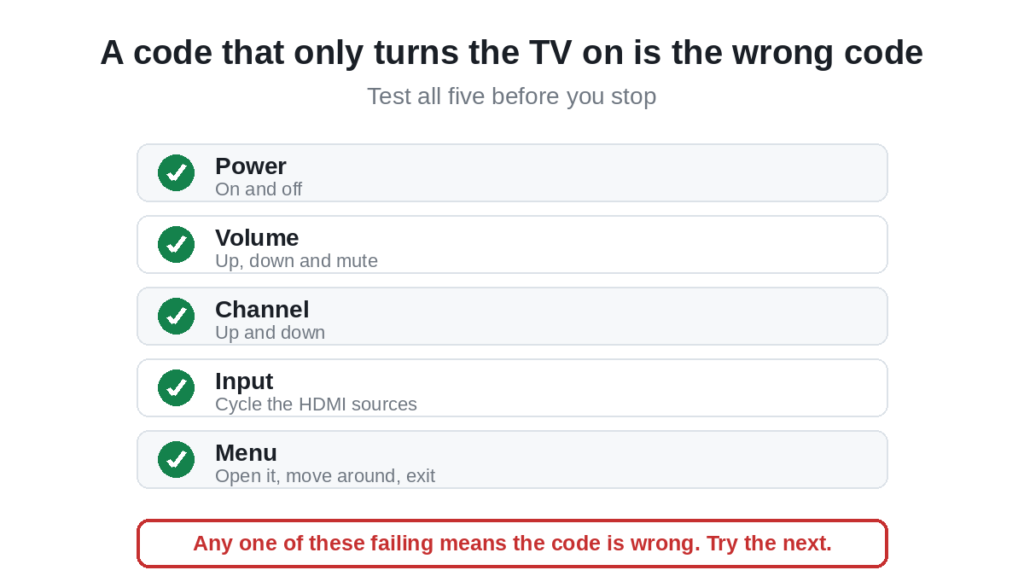
A code that turns the TV on and off is not necessarily the right code. Because brands share infrared protocols, partial matches are common, and you usually discover the problem two days later when the volume button does nothing.
- Power. On and off.
- Volume. Up, down and mute.
- Channel. Up and down. Works only through an aerial or coaxial input, not inside a streaming app.
- Input or Source. Cycle through the HDMI inputs.
- Menu. Open it, move around with the arrows, then exit.
If any one of those fails, the code is wrong. Go back and try the next one in your brand row.
Method 2: Auto code search
Use this when nothing in the lists works. The remote walks through every code it holds and you stop it on the right one.
- Switch the device on
- Press and hold Setup until the light stays on
- Press the device button
- Press and hold Power, or tap the up arrow repeatedly, depending on your model
- The remote sends one code every second or two. Keep it pointed at the device
- The instant the device responds, press Enter or OK to lock it in
It takes patience. Miss the moment and the remote carries past the right code and you start over. Our guide to programming any remote without codes covers this in more detail.
Method 3: Brand search
Faster than a full auto search, if your remote supports it. Instead of every code in the library, it steps through only the codes for one brand.
- Press and hold Setup until the light stays on
- Press the device button
- Press the first letter of the brand on the keypad, if your model offers it
- Tap the up arrow to step through that brand’s codes
- Press Enter when the device responds
The full walkthrough is in how to program a GE universal remote.
When a code will not work
Work down this list in order. The first three cause almost every failure.
- Wrong code list version. Covered at the top. A CL4 code in a CL3 remote does nothing at all.
- Weak batteries. Programming draws much more power than ordinary use. A battery with just enough charge for a volume command will quietly die partway through a setup sequence. Fit a fresh pair from a sealed pack.
- Wrong device mode. Still in DVD mode while entering a TV code. Press the right device button first, every single time.
- Setup timed out. Most GE remotes allow around ten seconds per step. Pause too long and setup closes without telling you.
- Blocked sensor. The infrared window is on the lower bezel of the TV. A soundbar or games console in front of it stops the signal. Stand within three metres and aim at the bottom of the screen.
- Memory full. Some models hold only a few devices. Reset the remote to factory settings and start again.
- Bluetooth device. If the original remote has a microphone button, the device uses Bluetooth and no infrared code will ever reach it.
Frequently asked questions
Where is the code list version on a GE remote?
Inside the battery compartment. Take the batteries out and look at the floor of the compartment and at the inside of the cover. It reads CL3, CL4, CL5 or CL6. If nothing is printed, you probably have an older three digit remote.
Do GE codes work across the different versions?
No. That is the whole point of the versions. A code from the CL5 list will not work on a CL3 remote, and the remote gives you no clue why.
Why does the same code appear under two different brands?
Because many televisions share panels and electronics, and the remote matches the infrared protocol rather than the brand name. One code driving two brands is normal, not a mistake in the list.
My GE remote turns the TV on but the volume does nothing.
You have a partial match. Keep working down the list for your brand until you find one where power, volume, channel, input and menu all respond.
Can I use a five digit code on a GE remote?
No. GE remotes take three or four digits. A five digit code belongs to a different brand of remote.
What if no code works at all?
Run the auto code search. It reaches codes that are not printed in any list. If that also fails, the device may be Bluetooth rather than infrared, in which case no universal remote code will help.
How do I reset a GE universal remote?
Take the batteries out, press and hold the power button for around sixty seconds to drain the residual charge, then put fresh batteries in. That clears stored devices and returns it to factory settings.
Will a GE remote control my Roku TV?
Usually yes for a Roku TV, since those use infrared. A separate Roku streaming stick often uses Bluetooth and will not respond. The codes are in the streaming section above, and we have a dedicated guide to GE universal remote codes for Roku TV.
In short
Check the code list version inside the battery compartment before anything else, because GE universal remote codes do not carry across versions. Find your brand in the table, put the remote in the right device mode, and try the codes in order. Test power, volume, channel, input and menu before you decide a code has worked. If every code fails, let the auto search find it for you.
For other brands of remote, our list of universal TV remote control codes covers them in one place, and GE codes for a Sanyo TV goes deeper on that pairing.

