
Sanyo universal remote codes are listed on this page in all three formats, so whichever remote you are holding, the code you need is here. The lists are split by code length, because the right one depends on the remote in your hand, not on the TV.
There is also a walkthrough of all three programming methods, a way to check that a code has properly taken, and a troubleshooting section for when everything looks right and the TV still ignores you.
Try these first
If you want to get this done in thirty seconds, these are the Sanyo codes that work on the widest range of sets. Try them in this order before working through the full lists.
- Three digit remotes: 049, then 110, then 097
- Four digit remotes: 0049, then 0110, then 0097
- Five digit remotes: 10154, then 10159, then 10054
One of those three covers most Sanyo televisions. If none of them work, carry on reading.
Does your remote need 3, 4 or 5 digits?
This is the part most code lists leave out, and it is why people end up trying codes that were never going to work on their remote.
The number of digits is set by the universal remote, not by the Sanyo TV. The same television will answer to a three digit code on an old remote and a five digit code on a newer one.
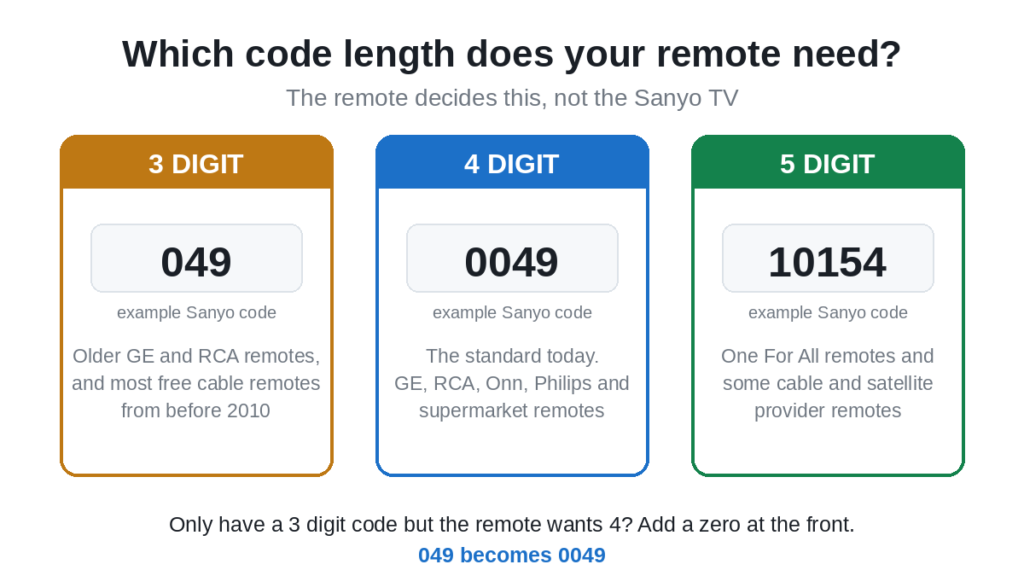
- Three digits. Older GE and RCA remotes, and most remotes that came free with a cable box before roughly 2010.
- Four digits. The standard today. GE, RCA, Onn, Philips and nearly every supermarket universal remote.
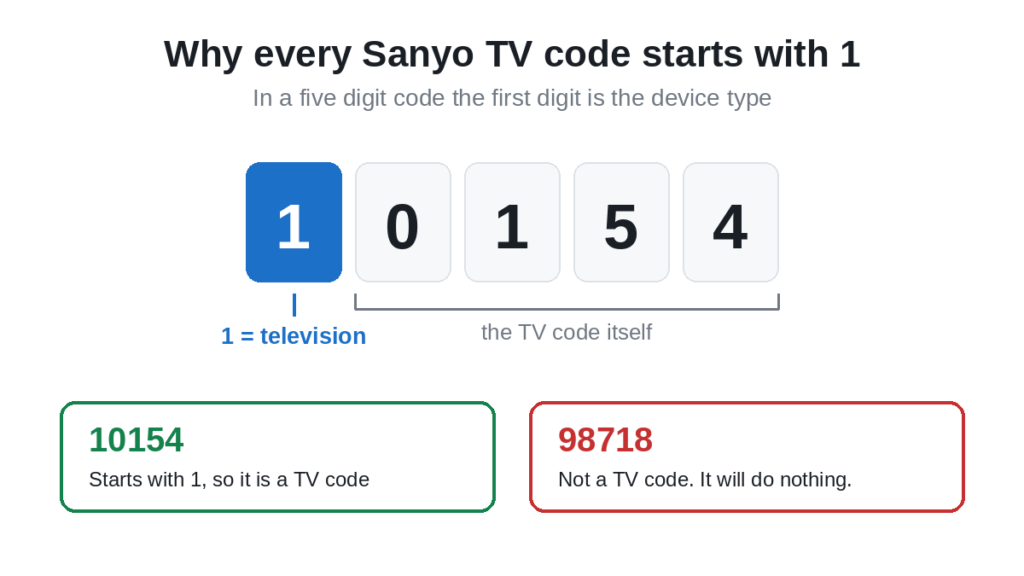
- Five digits. One For All models and some cable provider remotes. In a five digit code the first digit says what kind of device it is, and 1 always means a television. That is why every Sanyo TV code below starts with a 1.
Not sure which you have? Look at the leaflet that came with the remote, or just start typing a code. A remote that wants four digits will not react at all to three.
Useful trick: if you only have a three digit code and your remote wants four, add a zero at the front. A remote that expects 0049 will usually accept it where the old list printed 049. It does not always work, but it costs nothing.
Sanyo universal remote codes, 3 digit
Start at the top left and work across. The first row holds the codes that cover the most Sanyo models.
| 049 | 110 | 097 | 004 | 180 | 012 |
| 080 | 050 | 107 | 108 | 162 | 268 |
| 039 | 055 | 098 | 159 | 191 | 240 |
| 021 | 052 | 056 | 089 | 077 |
The last few in this list are for older Sanyo sets, roughly pre 2010. If you have a flat screen bought in the last decade, the earlier codes are far more likely to work.
Sanyo universal remote codes, 4 digit
This is the list most people need, because four digits is the standard on virtually every universal remote sold today.
| 0049 | 0097 | 0110 | 0004 | 0268 | 0012 |
| 0108 | 0081 | 0506 | 0412 | 5014 | 5130 |
| 5264 | 5473 | 0154 | 0037 | 0178 | 0236 |
| 0495 | 1142 | 1362 | 1480 | 1564 | 2049 |
| 3488 | 4168 | 4667 | 4740 |
Note that several of these are simply the three digit codes with a zero added at the front. That is not a mistake, it is how the four digit system was built, and it is why the leading zero trick works.
Sanyo TV codes, 5 digit
Needed for One For All remotes and for some remotes supplied by cable and satellite providers. Every code here begins with 1, which is the device digit for a television.
| 10005 | 10036 | 10037 | 10054 | 10088 | 10107 |
| 10146 | 10154 | 10159 | 10178 | 10232 | 10236 |
| 10250 | 10463 | 10484 | 10495 | 10631 | 10650 |
| 10663 | 10706 | 10735 | 10798 | 10799 | 10811 |
| 10815 | 10885 | 10893 | 10929 | 11142 | 11276 |
| 11362 | 11454 | 11463 | 11480 | 11514 | 11564 |
| 11612 | 11647 | 11649 | 11670 | 11756 | 11764 |
| 11785 | 11818 | 12049 | 12434 | 12448 | 12455 |
| 12653 | 12878 | 13001 | 13183 | 13488 | 13547 |
| 14168 | 14398 | 14667 | 14675 | 14740 | 14972 |
| 15545 | 15953 | 17415 | 17560 | 18924 | 19332 |
| 19617 | 19655 | 19740 |
If you find a five digit Sanyo code elsewhere that does not start with a 1, it is not a television code. It will either do nothing or it will try to control a DVD player or an audio device instead.
Sanyo codes by remote brand
If you know which brand of remote you are holding, start here instead of working through the full lists. These are the codes that brand most often ships for Sanyo.
| Remote brand | Try these Sanyo codes, in order |
|---|---|
| GE | 110, 097, 049, 004, 169 |
| RCA | 049, 048, 004, 110 |
| Philips | 181, 038, 184, 173 |
| One For All | 154, 159, 146, 107 |
These are three digit codes. On a four digit GE or RCA remote, add a leading zero. We have a fuller breakdown in our guide to GE universal remote codes for a Sanyo TV, and the complete brand list in GE universal remote codes.
How to find your Sanyo TV model number
Most codes work across the whole Sanyo range, so you usually will not need this. It matters when nothing in the lists works and you need to search for your exact set.
- On the back of the TV. A white or silver label, normally in the lower corner. Sanyo model numbers start with letters, usually DP or FW, followed by digits.
- On the edge of the bezel. Smaller sets sometimes print it along the right hand side rather than the back.
- In the TV menu. Menu, then Settings, then About or System Information. It is listed there alongside the software version.
Write it down before you start. It is the first thing you will be asked for if you end up contacting support.
Method 1: Enter the code directly
The quickest way in when you already have a code from the lists above.
- Switch the Sanyo TV on using the button on the set, not the remote
- Press and hold Setup on the universal remote until the indicator light stays on steadily
- Press the TV device button
- Type the code
- The light blinks twice or switches off, which means the code was accepted
- Point the remote at the TV and press Power
If the TV switches off, you have the right code. Do not stop there. Run the test in the next section before you decide you are finished.
Method 2: Auto search
Use this when none of the listed codes work. The remote steps through every code it knows and you stop it on the right one.
- Switch the TV on
- Press and hold Setup until the light stays on
- Press the TV device button
- Press and hold Power, or tap the up arrow repeatedly, depending on your model
- The remote now sends one code every second or two. Keep it pointed at the screen
- The instant the TV switches off, press Enter or OK to lock it in
This can take several minutes and you have to watch the whole time. Miss the moment and the remote carries on past the right code, and you start again. Our guide to programming any remote without codes covers this method in more depth.
Method 3: Brand code search
Some remotes let you search within a single brand rather than the entire library, which is much faster than a full auto search.
- Press and hold Setup until the light stays on
- Press the TV device button
- Enter the brand search code for Sanyo if your remote uses one, or press the first letter of the brand on the keypad
- Tap the up arrow to step through Sanyo codes one at a time
- Press Enter the moment the TV responds
Check the code properly before you stop
This is where most people go wrong. A code that switches the TV on and off is not necessarily the right code. Sanyo sets share infrared protocols with other brands, so a partial match is common, and you only find out two days later when the volume button does nothing.
Test all five of these:
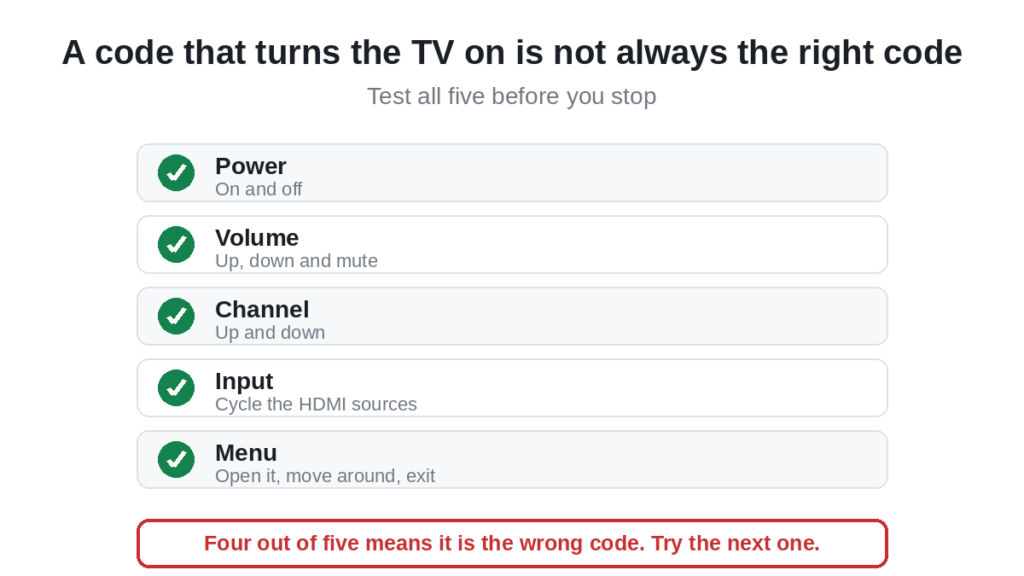
- Power. On and off.
- Volume. Up and down, and mute.
- Channel. Up and down. Only works through an aerial or a coaxial input, not inside a streaming app.
- Input or Source. Cycle through HDMI inputs.
- Menu. Open the TV menu and navigate with the arrows, then exit.
If any one of those fails, go back and try the next code in the list. A code that does four out of five is the wrong code.
When a code will not work
Work down this list in order. The first two cause most failures.
- Weak batteries. Programming draws far more power than ordinary use. A battery with just enough charge to send a volume command will often die halfway through a setup sequence, and the remote gives you no warning. Fit a fresh pair from a sealed pack before you blame the code.
- Wrong code length. Covered at the top of this page. A four digit remote simply ignores a three digit entry.
- Wrong device mode. If the remote is still in DVD or AUX mode, every TV code fails. Press the TV button first, every time.
- Blocked sensor. The infrared window sits on the lower bezel of the TV, usually bottom right. A soundbar, a games console or a photo frame in front of it will stop the signal. Stand within three metres and aim at the bottom of the screen.
- Setup mode timed out. Most remotes allow about ten seconds per step. Pause too long and setup closes silently, so your code goes nowhere.
- Remote memory is full. Some remotes store only a few devices. Reset the remote to factory settings and start again.
Still stuck after all of that? Our Sanyo programming troubleshooting guide goes deeper, and the full Sanyo programming walkthrough covers learning mode and macros for remotes that support them.
Sanyo DVD players, Blu-ray players and soundbars
An honest note here rather than a padded list. Sanyo audio and disc players use a separate code set from the televisions, and the codes vary so much between individual models that a general list is close to useless. Published lists for these devices are often wrong.
The reliable route is auto search:
- Switch the device on by hand
- Press and hold Setup until the light stays on
- Press the DVD or AUX device button, not TV
- Run the auto search as described in Method 2
- Press Enter when the device responds
The fastest check of all is the model number printed on the back of the unit. Searching the manufacturer code list for that exact model beats guessing from a general list every time.
Frequently asked questions
Do all Sanyo TVs use the same remote code?
Not all, but many do. Sanyo sets share a small number of infrared protocols, which is why 049 and its four and five digit equivalents cover such a large part of the range. That is also why those are worth trying first.
The power button works but the volume does not. Why?
You have found a partial match. The code is close but not exact. Keep going down the list until you find one where power, volume, channel, input and menu all respond.
Can I use a 3 digit code on a 4 digit remote?
Often, by adding a zero at the front. Try 0 followed by the three digit code. If the remote rejects it, use the four digit list instead.
Why do all the 5 digit Sanyo codes start with 1?
Because in the five digit system the first digit identifies the device type, and 1 is the code for a television. A five digit code starting with any other number belongs to a DVD player, an audio device or a set top box.
What if no code works at all?
Run auto search. It tests codes that are not printed in any list, including ones added in later firmware. If auto search also fails, the remote may not support Sanyo at all, and a genuine Sanyo replacement remote is the better answer.
Where is the code list that came with my remote?
On the leaflet in the box, or printed inside the battery compartment lid on some models. If it has gone, the manufacturer’s support site usually has a PDF. One For All publishes its search method instructions online, and most other brands do the same.
Will a Sanyo TV code work on a Sanyo soundbar?
No. Audio devices use a different code set entirely. Put the remote into audio or AUX mode and run auto search, as described above.
Do I need my TV model number?
Usually not. It only matters when the standard codes fail and you need to search for your specific set.
In short
Work out how many digits your remote wants, then take the codes from the matching list. Try 049, 0049 or 10154 first, depending on length, because those cover the most Sanyo televisions. Test power, volume, channel, input and menu before you decide a code has worked. If every code fails, run the auto search and let the remote find it for you.
For the wider picture, our list of universal TV remote control codes covers every major brand in one place.

Sidra is a skilled content writer with over 9 years of experience, creating clear and helpful articles on a wide range of topics. Sidra is also well-known for her knowledge of remote controls, codes, and setup guides, helping thousands of people with simple and reliable solutions. Her goal is to combine expert content writing with practical knowledge, making information easy to understand and useful for everyone. In her free time, she enjoys exploring new technology and sharing helpful tips with the community.
