
Learn how to program a Spectrum remote to your TV with simple, step by step instructions. This guide explains easy setup methods, common remote codes, and troubleshooting tips to help you quickly connect your Spectrum remote and control your TV without hassle.
There are now several TV brands that are compatible with Spectrum remotes. This comprehensive guide will help you program your TV whether or not you have a code. You will find all the Spectrum remote codes for different TV brands listed on this page, along with instructions on how to pair the remote with your television.
The following is the remote control guide for Spectrum’s latest models. Many Spectrum customers may have had an older version of the Charter model controller for the past few years. It used to be that Charter TV remotes could only work with a few popular TV brands, but Spectrum TV remotes now have the ability to work with hundreds of popular TV brands.
Also Read: GE Universal Remote Codes For Roku TV & Programming [2024]
Spectrum remote codes for TVs
At the end of this article, I will provide a link to a user manual PDF file that contains the codes for the most popular TV brands, as well as audio accessories.
- Dynex – 12049, 10463
- Element TV – 13559, 11687, 12183, 12964, 11864, 14660, 12746
- Emerson – 11864, 10171, 10463, 11963, 10180, 11394, 11913, 10178, 11454, 11661, 11997, 12183, 11578, 11142, 11928, 13559
- GE (General Electric) – 11661, 11447, 11347, 10178, 10765, 12360
- Haier – 11748, 13382, 11712, 14398, 11032, 11034, 11570, 12352, 13204
- Hisense – 12183, 14740, 11660, 12098, 11314, 10748, 13382, 14398
- Insignia – 12049, 11641, 11564, 10463, 11326, 11385, 11204, 11423, 11517, 10171, 11660, 11963, 12751
- JVC – 11326, 13204, 10150, 11774, 12321, 11923, 11570, 11670, 11480, 1463
- LG TV – 11423, 10178, 12864, 14398, 12867, 10017, 10442
- Magnavox – 11454, 12597, 11867, 11963, 11913, 11990, 10171, 11365, 11755
- Onn – 11756
- Panasonic – 11480, 12240, 11927, 11947, 11924, 10171, 11060, 10150, 10156, 10178, 11142, 11347, 11454, 11774, 12360
- Philips – 11454, 11867, 12597, 12622, 10017, 10171, 11963, 13678, 11365, 11990, 11314, 11394, 10810
- RCA – 12746, 12434, 13577, 11347, 13382, 13717, 13332, 12932, 11447, 11385, 13895, 13939, 12183, 13636, 13794, 12855, 14079, 14053,
- Roku TV – 11756, 11602
- Samsung TV – 12051, 13993, 10060, 11959, 10766, 11480, 10814, 10178
- Sansui – 10463, 11670, 14053, 11938, 11409, 14442, 10171, 13559
- Sanyo – 11142, 12049, 11480, 11454, 11564, 10088
- Sceptre – 11712, 11217, 11360, 11599, 10878, 12506
- Sharp – 12360, 12183, 14740, 11589, 14121, 11457, 14398
- Skyworth – 11454, 11314
- Sony – 10810, 11685
- Sylvania – 11864, 10171, 11454, 11963, 11913, 11394, 11314, 13332, 13577, 14053
- TCL – 12434, 14398
- Toshiba – 11524, 10156, 11670, 12684, 11959, 11704, 11343, 11480, 14730, 10060, 11369, 11142
- Vizio TV – 11758, 12707, 11756, 10864, 10885
- Westinghouse – 11712, 13559, 13382, 10885, 12196, 13094, 11282, 12397, 13389, 13908, 14796, 10463, 11217, 11661
- Zenith – 10017, 10178, 11643, 11423, 11661, 10810, 10463, 11365
How to program Spectrum remote to TV With Code?
- You should turn on the television
- To activate the ‘INPUT’ button, press and hold the ‘MENU’ button and the ‘OK’ button simultaneously
- According to your TV’s brand, enter the first number listed on the code list using the number keys.
- Correctly entering the code will cause the ‘INPUT’ key to blink TWICE
- Make sure the power and volume functions are working. As long as everything is working properly, the setup is complete
Alternate method:- One digit input
With the Spectrum remote, you can pair your TV with one digit using the most popular TVs. For example, Insignia, Dynex, LG, Zenith, Philips, Magnavox, TCL, RCA, Samsung, Sharp, Sony, Toshiba, and Vizio can be programmed using this method.
The following image shows a 1-digit code that you should note down
- You will need to turn on the TV you want to program
- When the ‘INPUT’ button blinks twice, press and hold the ‘MENU’ and ‘OK’ buttons
- The TV key is located on the remote’s top left corner. Press it and release it
- You can turn your TV off by pressing and holding the appropriate key based on the brand of your TV listed below
Insignia/Dynex – 1
LG/Zenith – 2
Panasonic- 3
Philips/Magnavox- 4
RCA/TCL- 5
Samsung – 6
Sharp – 7
Sony – 8
Toshiba – 9
Vizio – 0
You can turn off your Samsung TV by pressing and holding the number 6.
Without a code, how do I set up the Spectrum remote to the TV?
The instructions below will guide you through the process of programming the remote using the autocode search method. Remote controls are designed to identify TV brands and pair with them appropriately.
- You should turn on the television
- When the ‘INPUT’ button blinks twice, press and hold the ‘MENU’ and ‘OK’ buttons
- The TV button is located on the top of the remote control
- There is a solid light on the INPUT button
- You can use the remote to control the TV by pressing and holding the UP arrow
- The UP arrow should be released when the TV is turned off.
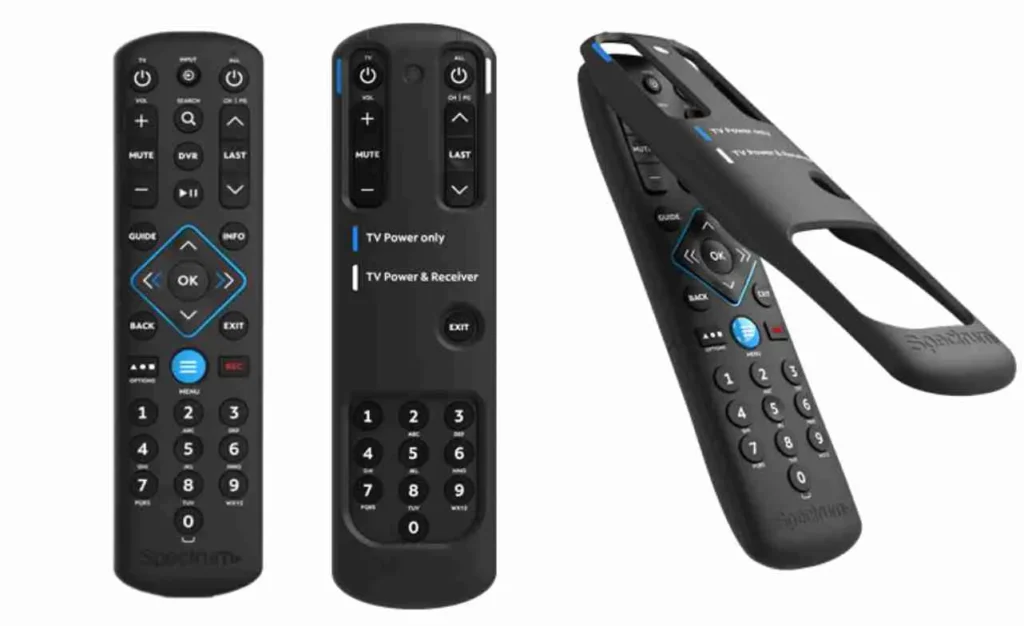
How do I program the remote control for OLD Spectrum Charter?
The way the Spectrum Charter remotes are programmed differs slightly from the new ones if you have an old model with a SETUP button (Models 1060BC2/1060BC3). Here’s how it works.
Click on the link below to find the codes
Choosing the Device type from the first drop down menu, then selecting the Brand name and listing out the codes from the second menu, will result in the list of codes. It is possible to find the codes for multiple types of devices this way, including TVs, LCD TVs, DVD players, cable boxes, and set top boxes.
Follow the instructions once you have found the code
- Make sure you have the correct video media inserted in your device (DVD, Blu-ray, TV, etc.).
- Use the Device key on the remote control to control the device (TV, DVD, AUX, STB, CBL).
- When the selected mode key blinks twice, press and hold the SETUP key
- You need to enter the five digit device brand key that you found
- It will blink twice when the Mode key is pressed
- You can turn off the device by pointing the remote at it and pressing the Power or Play button
It is best to retry with another code if the mode key blinks for a long period of time.
Read More: DirecTV Remote Codes for Vizio TV & Programming Guide
Remote control manual for Spectrum
Please download the PDF file from the following link if you would like a soft copy of the manual.
What to Do If Your Spectrum Remote Won’t Go Into Programming Mode
The first step is where a lot of people fail because the Spectrum remote never goes into programming mode.
Possible reasons and solutions:
- Press MENU and OK at the same time.
- Press and hold both buttons for five seconds.
- Let go only after the INPUT button blinks twice.
- Change the batteries before trying again.
- To avoid losing the IR signal, get closer to the TV.
- The remote won’t program correctly if the INPUT button doesn’t blink.
- The Spectrum Remote only controls the volume, not the power or input.
People complain about this a lot.
Why this happens:
The wrong profile for the TV was saved.
The remote and TV worked together in part.
How to make it work:
- Reset the remote for the Spectrum
- Instead of codes, use auto search to reprogram.
- Even if the TV brand is right, try a different brand code.
How to Reset a Spectrum Remote When Programming Doesn’t Work
Resetting the remote gets rid of programming that is wrong or not finished.Steps to reset:
- Take out the batteries.
- Press and hold the POWER button for ten seconds.
- Put in new batteries
- Begin programming again
- This fixes most problems with “remote not working.”
Auto Search Takes Too Long What to Do
A lot of people stop auto searching too soon.Important advice:
- Press the arrow button slowly, once every two seconds.
- It might take a few minutes for the auto search to finish.
- Don’t keep the button down.
- If nothing happens after a long time, start over.
- This method won’t work right away; you need to be patient.
Spectrum Remote Not Working With Roku or New Smart TVs
Some newer TVs don’t work with all devices.Important limits:
- Roku TVs might only be able to do basic things.
- The power may work, but the menu or input may not.
- To use advanced smart features, you need the original remote or TV app.
- This is why programming seems to work but doesn’t do much.
Other Ways to Control Your Device When the Spectrum Remote Doesn’t Work
Users can still control their TV with the Spectrum remote if it can’t be programmed.
- Remote apps for TV makers
- Spectrum TV app for mobile devices
- Apps for universal remotes
- Phones that have IR blasters
- This option lowers the bounce rate and makes users less angry.
Why does the Spectrum Remote stop working at random times?
Some common reasons are:
- Batteries that aren’t strong enough
- Updates for TV firmware
- Blockage of the IR sensor
- Reset by accident
Solution: Change the batteries and reprogram the remote.
Why This Missing Content Is Important
- Talks about real life user failures
- Increases time spent on page
- Lessens the bounce rate
- Targets search queries that are based on problems
Frequently Ask Questions
How can I set up my Spectrum remote to work with my TV without a code?
The auto search method lets you program a Spectrum remote without a code. This way, the remote can automatically scan for and find the right TV signal. Steps: Manually turn on your TV. Press and hold the MENU and OK buttons at the same time. Let go when the INPUT button blinks twice. Press the UP arrow a lot of times. When the TV goes off, stop. To save, click OK. You can still use this method even if you don’t know the brand or code of your TV.
Why isn’t my Spectrum remote working with my TV?
There are a few reasons why a Spectrum remote might not pair:
Batteries that are weak or oldButtons not pushed the right way. The remote won’t go into programming mode. The TV sensor is broken or blocked. Fix: Change the batteries. For a full five seconds, hold down MENU and OK. Point the remote directly at the TV. Try again after resetting the remote.
Why can my Spectrum remote change the volume but not the power?
This happens when the remote is only partially set up. Why:
The volume function worked, but the power command did not. Answer: Put the remote back to its original state. Reprogram using the automatic search method. Use a different code for your TV. This problem happens a lot and is easy to fix.
How do I start over with a Spectrum remote?
Most problems can be fixed by resetting, which clears all saved settings. How to reset:
Take out the batteries. Press and hold the POWER button for 10 seconds.Put in new batteries again. Change the programming on the remote. If programming doesn’t work, you should always reset.
Why Doesn’t the INPUT Button on My Spectrum Remote Blink?
If the INPUT button doesn’t blink, the remote isn’t going into programming mode. Some reasons are: Batteries are too weak. MENU and OK are not pressed at the same time. Buttons let go too soon.
How to fix:
Change the batteries. At the same time, press both buttons. Hold on until the blink happens.
How long does it take for the Spectrum remote to search automatically?
Depending on the TV, auto search can take a few minutes. Important advice:
Press the button slowly, once every two seconds. Don’t keep the button down. Be patient; stopping too soon could mess up the setup. A lot of people give up too quickly because they think it’s not working.
Does the Spectrum remote work with Roku TVs?
Spectrum remotes can be used with Roku TVs, but not all of them. What works: StrengthSound.
What might not work:
Roku’s menusAppsFeatures that are more advanced. Users of Roku TV may need the original remote or the Roku mobile app to have full control.
Can I use the Spectrum remote with smart TVs?
Yes, Spectrum remotes work with most smart TVs, but only for basic things likePowerAmountInputVoice control and other smart features need the original remote or TV app.
What if none of the Spectrum remote codes work?
If none of the codes work, use programming that automatically searches. Restart the remote. Try a different brand code. See if the TV can be controlled with IR. Some newer TVs use Bluetooth or Wi-Fi, which means that universal remotes won’t work with them.
Why Did My Spectrum Remote Suddenly Stop Working?
Some common reasons are: The battery is dead. Update for TV software. Resetting the remote by accident. Blocked IR sensor. Answer: Change the batteries. Reset the remote. Make sure there is a clear line of sight to the TV sensor.
Can one Spectrum remote control more than one device?
Yes, you can use Spectrum remotes to control: TVBox for cable, Sound bar. You have to program each device separately.
Conclusion
A simple process takes just a few minutes to program Spectrum remote controls to work with TVs. Using the remote, you can easily select channels, power your TV, and adjust volume after it has been properly paired.
The greater your overall convenience and seamless viewing experience, the more time and effort you’ll have to put into setting it up correctly and synchronizing it with your TV.

